 Kiai
KiaiRank Cards
Server rank card settings can be found in /settings > Leveling Settings. Personal rank card settings can be found in /preferences.
From either place, you can customize the background, primary color, and secondary color of rank cards. From /preferences, you can also set opacity.
Rank card customization is a premium-only feature. Server rank card customization requires Server Premium, and personal rank card customization requires User Premium.
Colors Explained
-
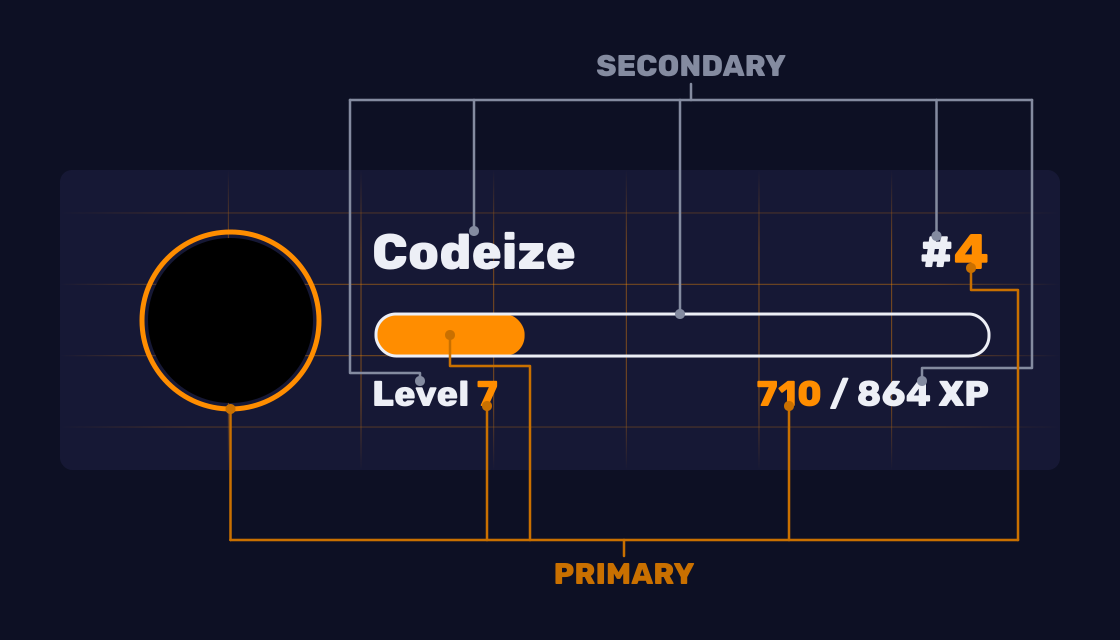
Primary Color: Applies to the member's current level, current XP, current rank position, the progress bar fill, and the ring around their avatar.
-
Secondary Color: Applies to everything else, including XP to next level, the level label, the username, the
#in front of the rank, and the outline of the progress bar.
If you set a custom primary or secondary color, the progress bar becomes a flat fill in your primary color. It loses the default gradient, which only appears when both colors are left at their defaults.
Opacity
Rank Card Opacity sets how transparent your rank card background is, from 10 to 100 percent. This is a personal, User Premium setting, available in /preferences. It affects only the background image. Text, the progress bar, and the avatar stay fully visible.
Server vs. Personal Rank Cards
-
Server Rank Card (Server Premium): Sets the default background and colors for every member in the server.
-
Personal Rank Card (User Premium): A premium member can override the server default with their own background, primary color, and secondary color.
If a premium member sets a personal color, it takes priority over the server's default color, even in a server that does not have Server Premium. If a member has not set a personal color, Kiai falls back to the server's default color, and if the server has not set one either, Kiai uses its built-in default colors.